Legacy website and app modernization: when to repair, rebuild, or replace
Old digital products do not always need a full rebuild. The right modernization path depends on risk, business value, and technical limits.
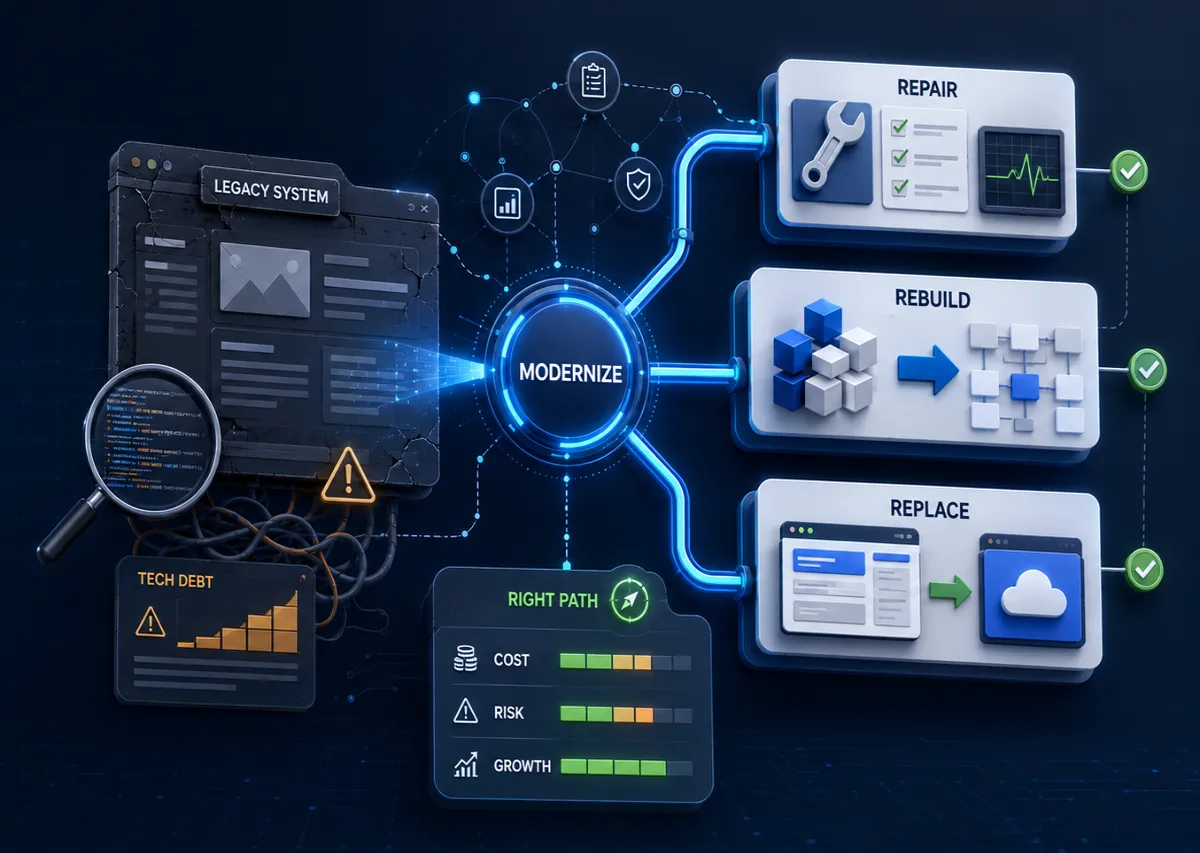
An old website or app rarely becomes a problem overnight. It becomes slower to edit, harder to secure, more fragile during updates, less useful on mobile, and increasingly dependent on one person who knows where everything is hidden. At some point the business notices that a simple change now feels risky.
That is the modernization moment.
The mistake is assuming modernization always means a full rebuild. Sometimes it does. Sometimes the smarter move is a focused repair, a staged migration, or replacing only the part that blocks growth. The right choice depends on what the system does for the business and how badly the foundation is limiting it.
First identify the business risk
Do not begin with technology. Begin with business risk.
Is the old site losing leads because pages are slow, vague, or hard to use? Is the app blocking staff because workflows require manual workarounds? Are customers complaining? Are security updates impossible? Is the current developer unavailable? Are integrations failing? Is the company avoiding new features because nobody trusts the code?
The answer shapes the modernization path. A brochure site with weak messaging may need a redesign and content restructure. A custom operations app with fragile permissions may need deeper engineering review. An ecommerce store with checkout issues may need urgent repair before a larger rebuild.
If the main issue is commercial performance, start with the website redesign checklist. If the issue is software behavior, evaluate the system more like a product.
Repair when the foundation is still sound
Repair is the right choice when the existing system is understandable, secure enough, and not fighting every change. The design may need polish, performance may need work, metadata may be incomplete, or some templates may be awkward, but the architecture still supports the business.
Repair work might include updating dependencies, optimizing images, improving Core Web Vitals, cleaning metadata, fixing redirects, improving forms, replacing a few components, tightening accessibility, or adding missing CMS fields.
This approach is cheaper and faster than a rebuild. It also avoids disrupting workflows that already work. The key is honesty. Repair only makes sense if the system can absorb the improvements without creating a chain of side effects.
For technical visibility issues, the technical SEO implementation checklist helps separate practical fixes from structural problems.
Rebuild when the system limits the business
A rebuild makes sense when the existing foundation prevents the business from reaching its next stage. Maybe the site cannot support multilingual content cleanly. Maybe page speed is poor because the theme ships too much code everywhere. Maybe the app has no clear data model. Maybe new features require editing copied code in ten places. Maybe staff depend on spreadsheets because the system cannot represent the real workflow.
Rebuilding is not failure. It is often what happens when a temporary solution proves the business need and then reaches its limit.
The danger is rebuilding without learning from the old system. The current product contains evidence: which pages get traffic, which features are used, which workarounds exist, which support questions repeat, and which assumptions were wrong. A good rebuild preserves what works and removes what slows the business down.
For custom workflow decisions, custom software vs SaaS can help decide whether the replacement should be custom, off-the-shelf, or a hybrid.
Replace when the problem is standard
Sometimes modernization means admitting that custom software should not exist anymore. If the old system handles a standard process badly, a mature SaaS product may now solve it better.
This can happen with scheduling, email marketing, simple CRM, support tickets, invoicing, analytics, or document signing. Replacing custom code with a reliable tool can reduce maintenance and free development budget for the parts of the business that are actually unique.
The decision should include data ownership, export options, integration needs, subscription cost, staff training, and how much the business process must change to fit the tool. A SaaS replacement is not automatically simple, but it can be the cleanest path when the custom system is only recreating common infrastructure.
Good modernization is not loyal to old code. It is loyal to the business outcome.
Watch for security and ownership problems
Legacy systems often hide ownership risk. The business may not control the domain, hosting, repository, analytics, deployment account, plugin licenses, or admin credentials. Backups may be untested. Dependencies may be outdated. Forms may send through an old mailbox. Sensitive files may be exposed through public links.
Before major work begins, collect access and clarify ownership. A developer cannot responsibly modernize a system without knowing where it lives, how it deploys, who can access it, and how it can be recovered.
For client portals, ecommerce, and apps with login, this becomes more serious. Permissions, password handling, file access, audit trails, and backups need review. If customers or staff depend on the system, modernization should reduce operational risk, not only improve the interface.
The client portal development article covers these questions for service businesses handling customer data.
Preserve SEO during changes
Modernization can improve search visibility, but it can also damage it. URL changes, deleted pages, missing metadata, blocked staging settings, broken canonicals, and lost internal links can undo years of accumulated value.
Before rebuilding a website, crawl the old site and gather data from analytics and Search Console. Identify pages with traffic, backlinks, conversions, and impressions. Decide what stays, what merges, what redirects, and what should be rewritten.
After launch, test redirects, sitemap output, indexability, metadata, structured data, and key internal links. Do not assume the new site is SEO-safe because it looks better.
This is also where SEO agencies and developers should work closely. The article on SEO agency development partnerships explains how to make that collaboration productive.
Modernize in slices when possible
A staged approach can reduce risk. Instead of replacing everything at once, the team may rebuild public pages first, then migrate the CMS, then improve checkout, then replace an internal dashboard. Or they may build a new client portal while leaving the marketing site untouched.
Slicing works best when boundaries are clear. Which system owns users? Which system owns content? Which URLs change? Which integrations are shared? Which data must migrate? Without clear boundaries, a staged modernization can become more confusing than a full rebuild.
For startups, this thinking is essential. The startup technical foundation article covers how early architecture choices affect future speed.
What a modernization audit should produce
A useful audit should not end with "this is outdated." It should produce a decision.
The output should explain what the system does, what risks exist, what can be repaired, what needs rebuilding, what should be replaced, what the likely phases are, and which first step creates the most value. It should also separate urgent issues from quality improvements.
For example: fix broken forms immediately, compress images this week, plan redirects before redesign, replace the booking plugin next month, and schedule a full CMS rebuild after content is approved. That is more useful than a vague recommendation to modernize everything.
The goal is confidence
Modernization is successful when the business regains confidence in its digital system. Content can be edited. Pages load quickly. Search value is protected. Staff workflows make sense. Customers can complete tasks. Developers can make changes without fear.
Whether that requires repair, rebuild, or replacement depends on the current system. The important thing is to choose deliberately.
Have a project in mind?
Get an honest, fixed quote before any work begins.